> ## Documentation Index
> Fetch the complete documentation index at: https://docs.getayna.com/llms.txt
> Use this file to discover all available pages before exploring further.
# Preparation Stage
> Before you start generating on Ayna, there are a few things to get right. This section covers which garment categories Ayna supports and how to set up your camera for clear, high-quality inputs.
## What You Can Shoot on Ayna
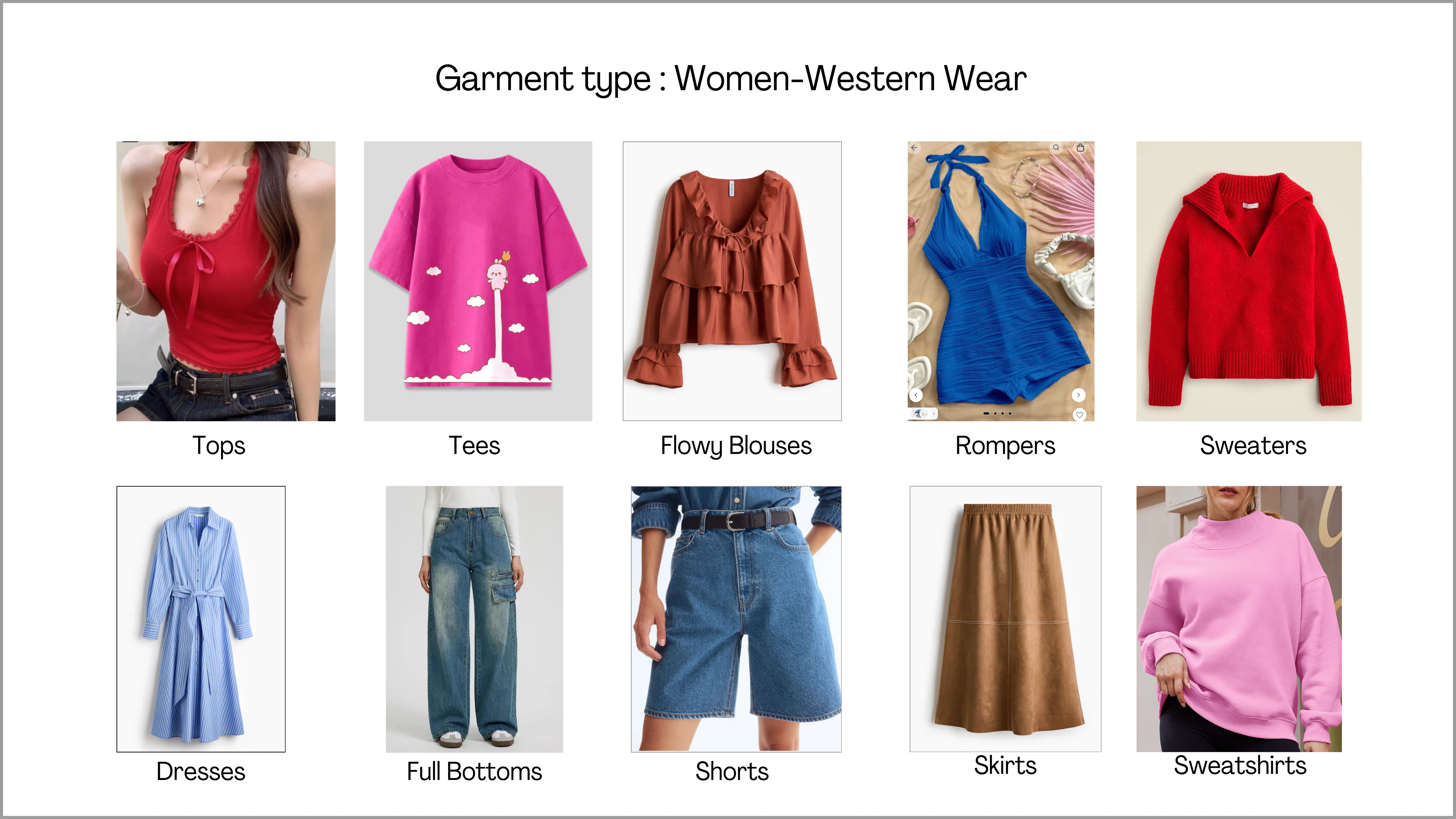
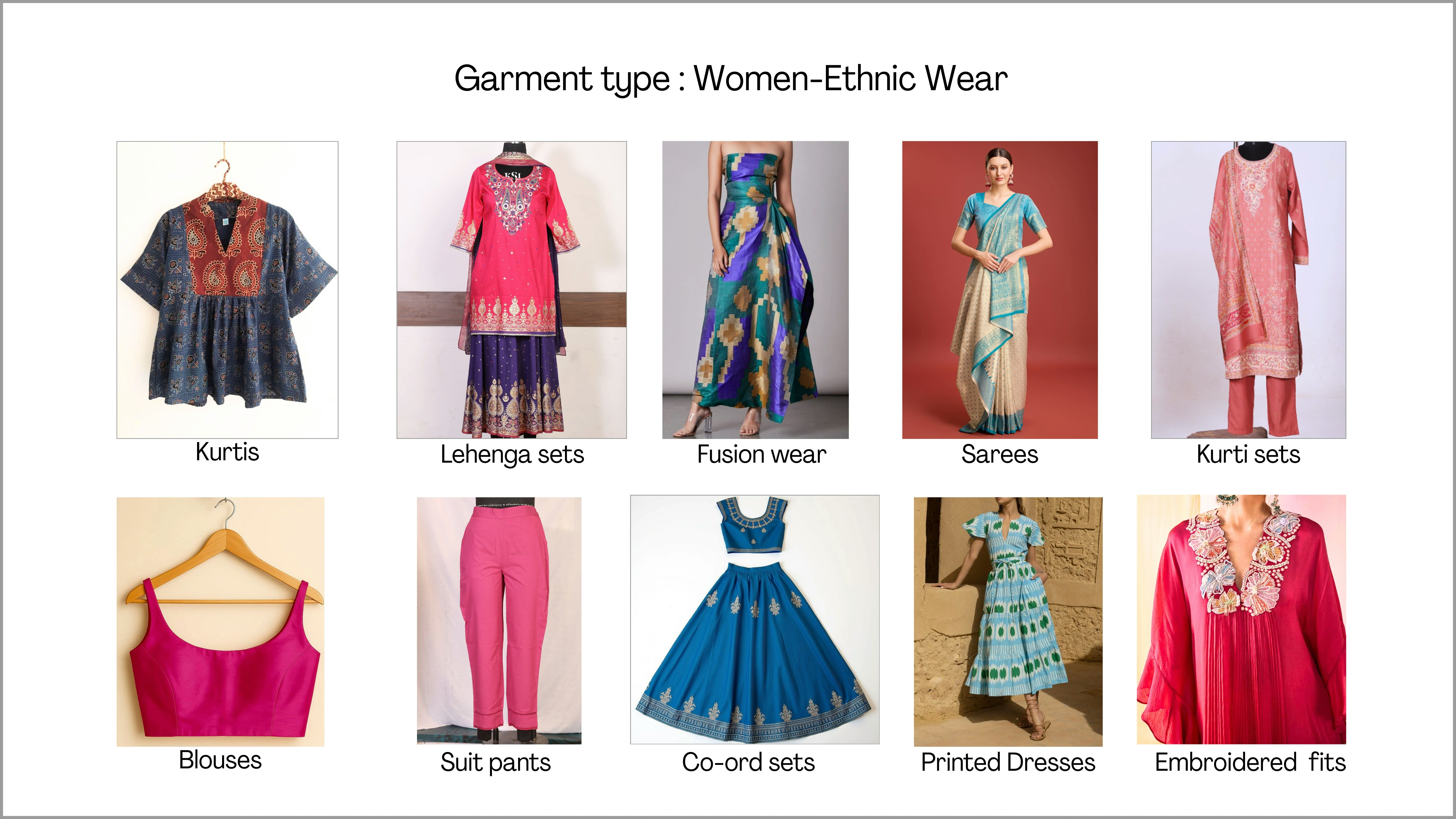
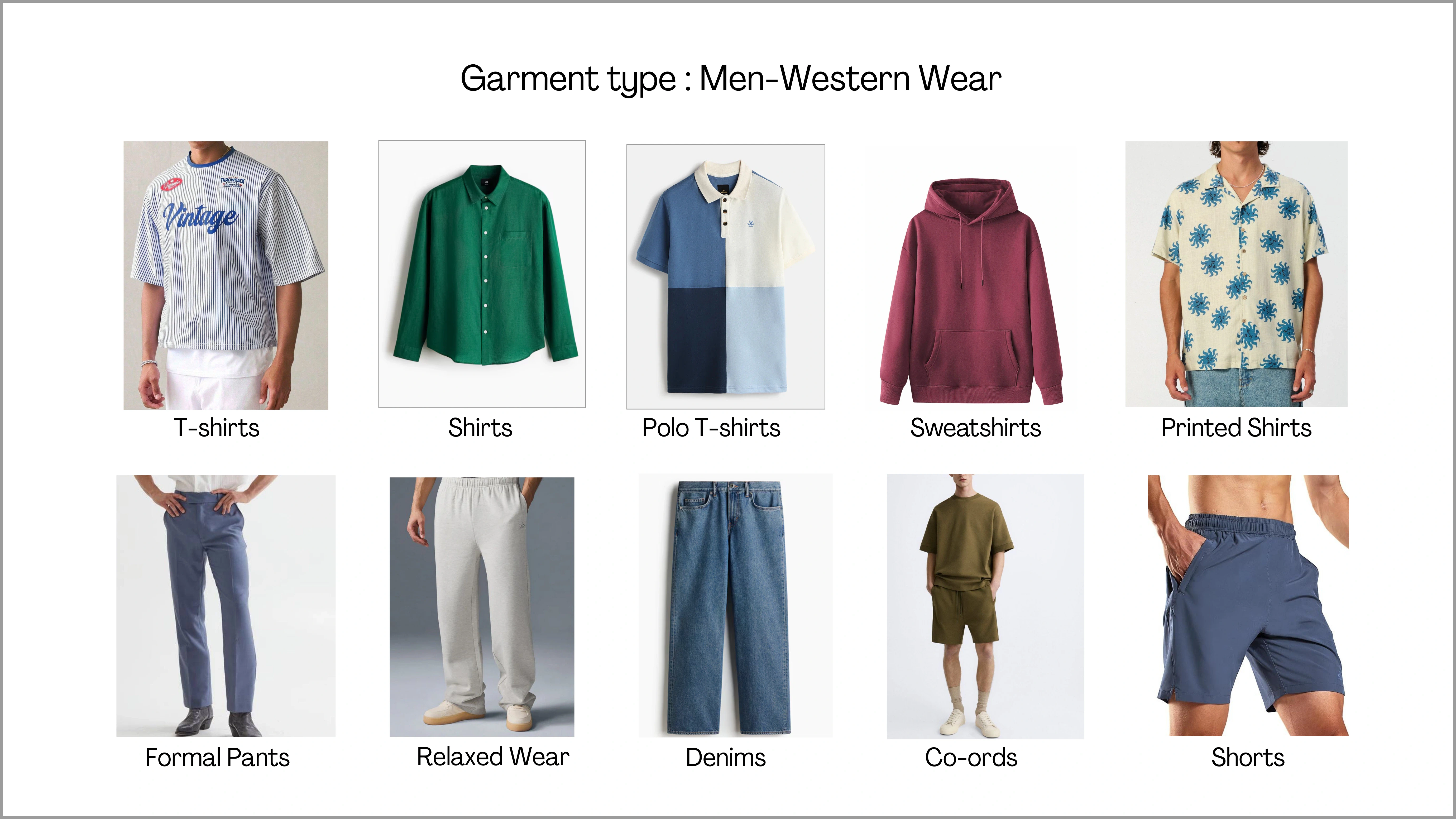
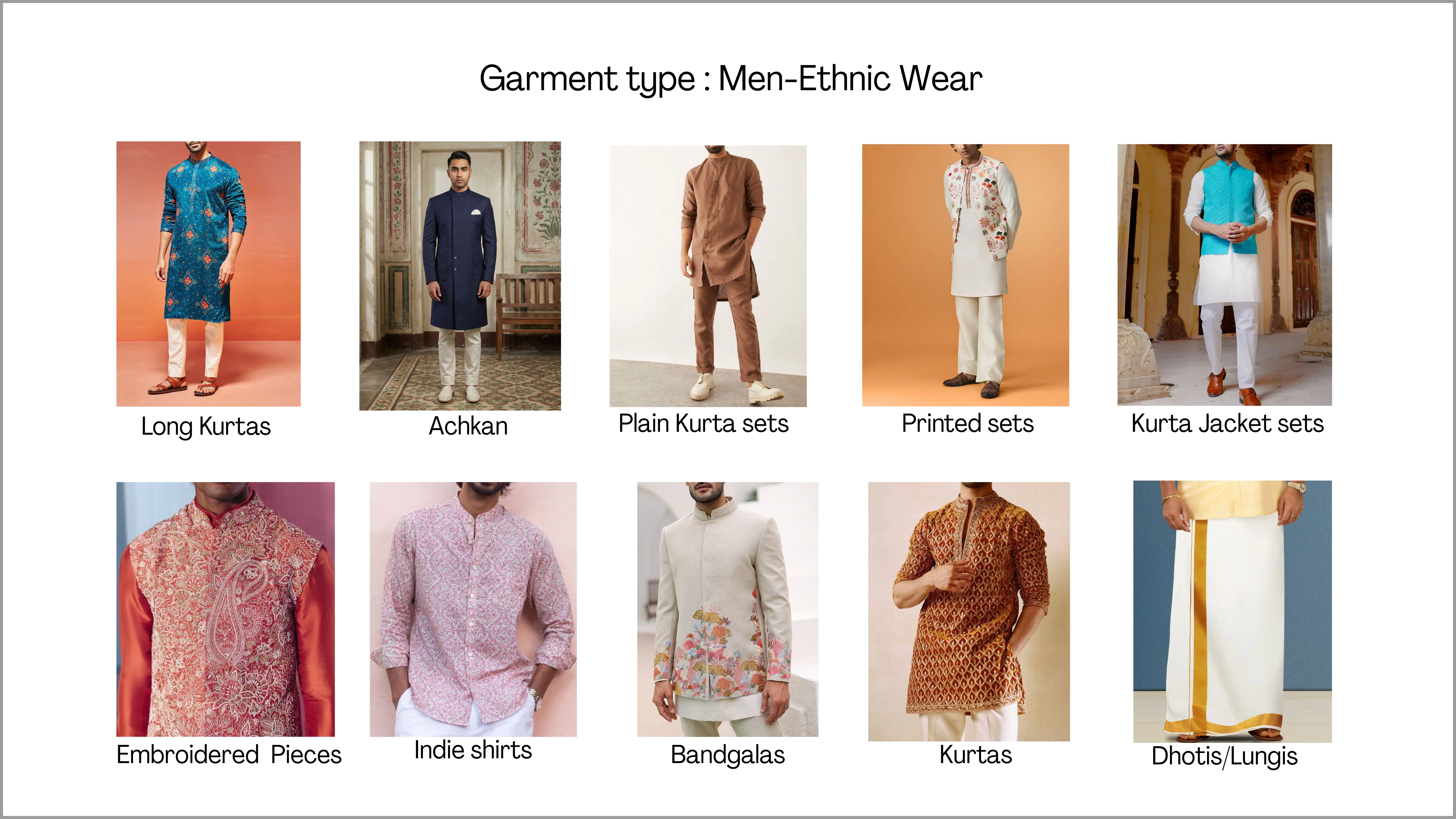
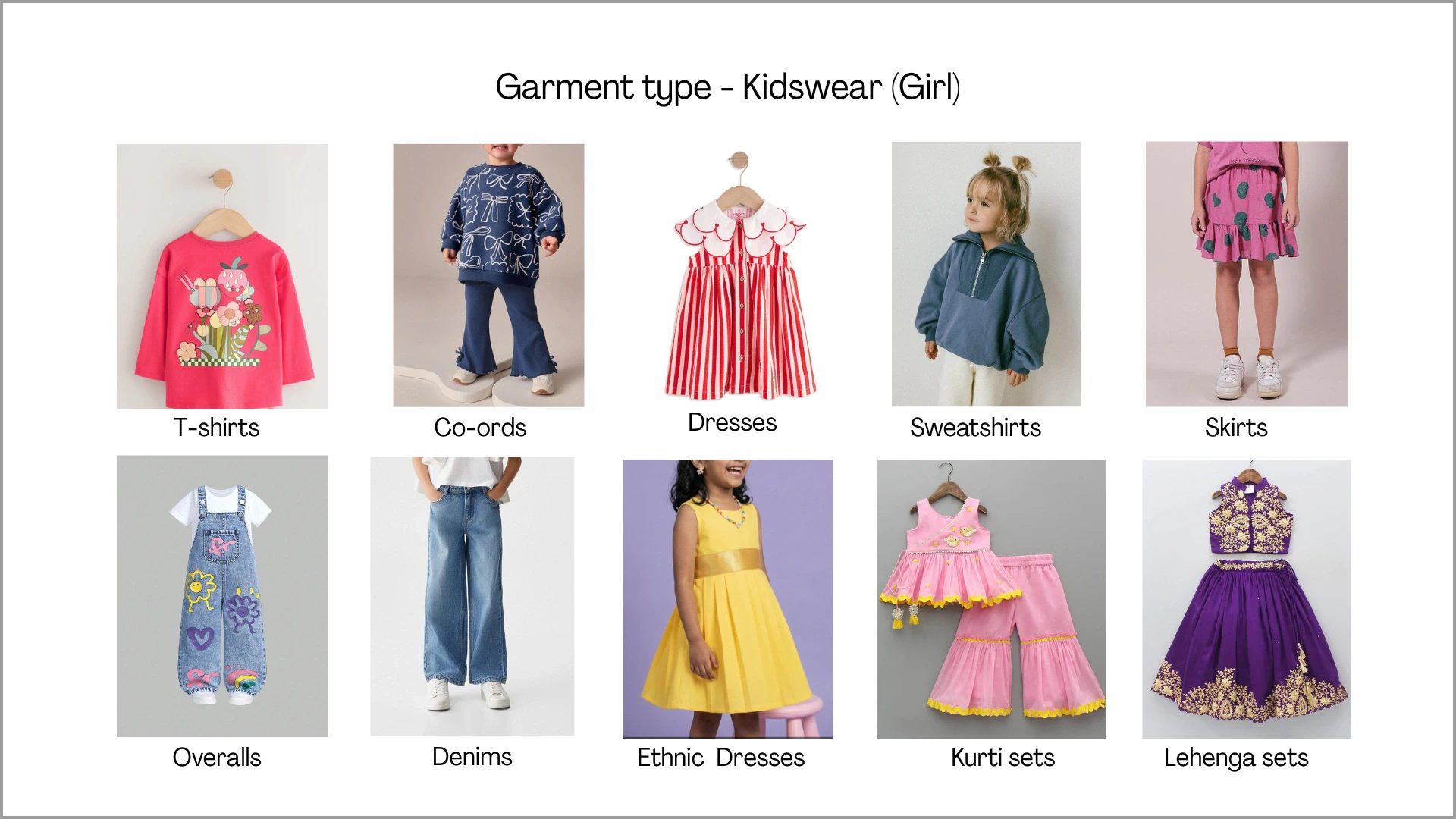
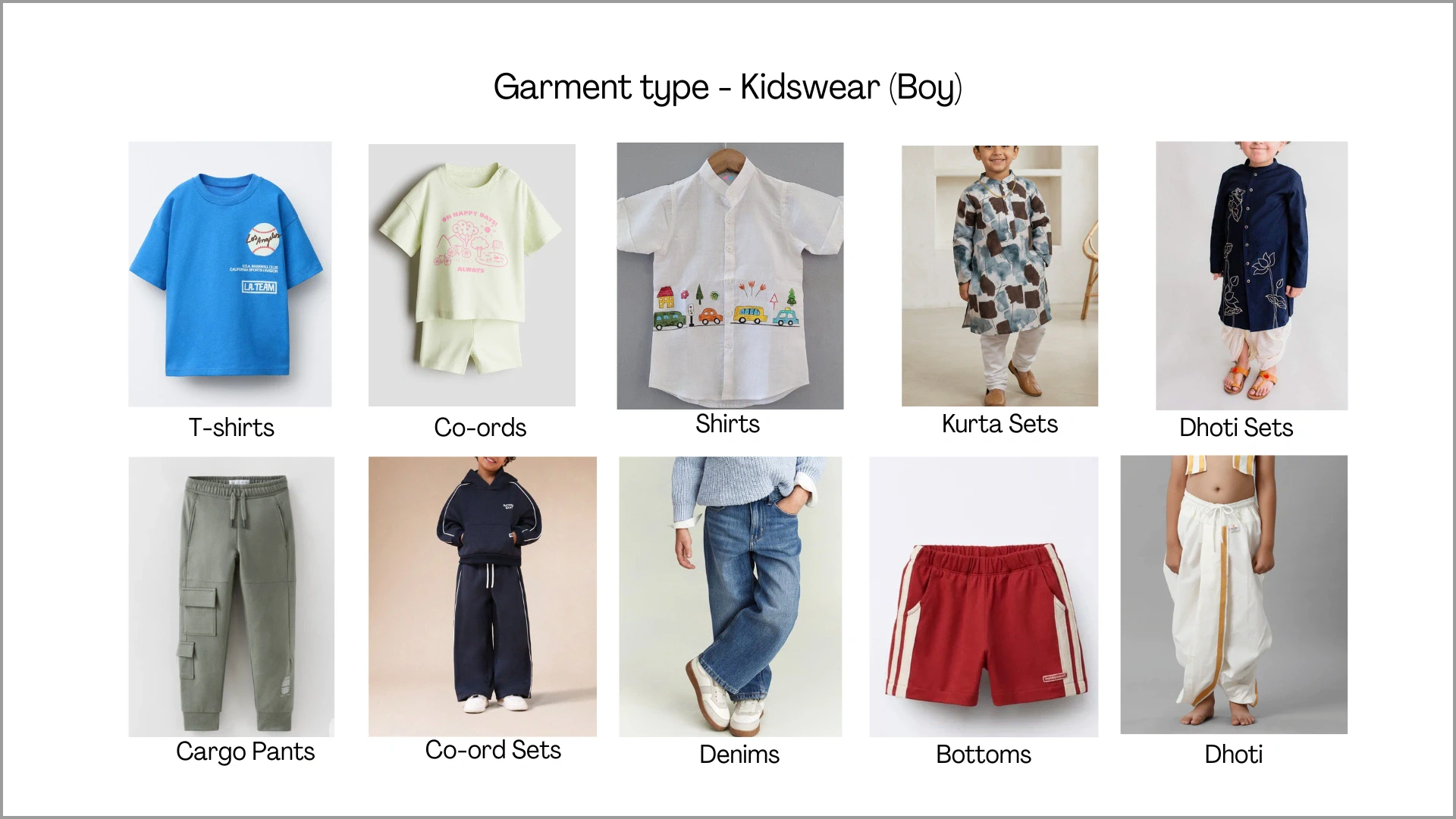
Ayna supports a wide range of garment categories. You can shoot and generate outfits for multiple segments, including **Men's wear, Women's wear, and Kids wear**, in both **ethnic and western styles**. This makes it easy for brands to use Ayna for different product categories under one platform.
### Women: Western Wear
 ### Women: Ethnic Wear
 ### Men: Western Wear
 ### Men: Ethnic Wear
 ### Kidswear: Girl
 ### Kidswear: Boy
 Ayna also supports custom garment styles beyond the categories shown above. If you have specific requirements or would like to check compatibility for your brand's unique styles, feel free to reach out to our team at [support@getayna.com](mailto:support@getayna.com).
## Recommended Clicking Methods
While Ayna supports a wide range of garment categories, the quality of the final AI output depends heavily on how the garment is prepared and photographed before upload. Certain garment types like sarees or heavy detailing, require specific input formats to achieve the best results. Refer to the guidelines below before proceeding with your shoot.
### Sarees
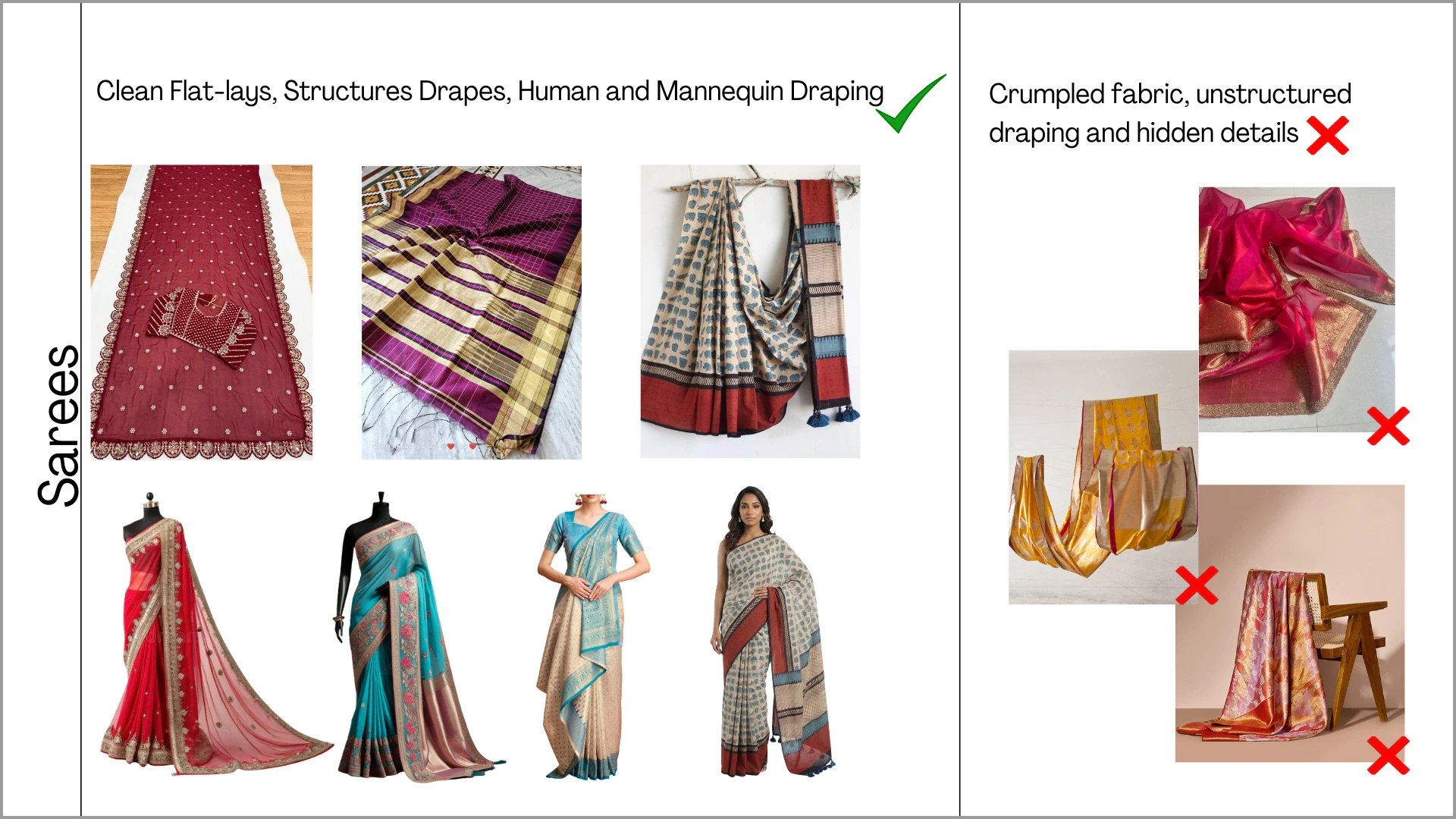
To achieve accurate drape and full prints in AI results, the input image must clearly show the full drape, pleats, borders, and fall in a well-arranged format.
**DOs**
* Upload sarees properly draped on a mannequin or worn by a model
* Ensure pleats, pallu, and borders are clearly visible
* Keep the fabric neatly arranged and wrinkle-free
**DON'Ts**
* Avoid crumpled or folded fabric shots
* Do not upload small or incomplete flatlays
Ayna also supports custom garment styles beyond the categories shown above. If you have specific requirements or would like to check compatibility for your brand's unique styles, feel free to reach out to our team at [support@getayna.com](mailto:support@getayna.com).
## Recommended Clicking Methods
While Ayna supports a wide range of garment categories, the quality of the final AI output depends heavily on how the garment is prepared and photographed before upload. Certain garment types like sarees or heavy detailing, require specific input formats to achieve the best results. Refer to the guidelines below before proceeding with your shoot.
### Sarees
To achieve accurate drape and full prints in AI results, the input image must clearly show the full drape, pleats, borders, and fall in a well-arranged format.
**DOs**
* Upload sarees properly draped on a mannequin or worn by a model
* Ensure pleats, pallu, and borders are clearly visible
* Keep the fabric neatly arranged and wrinkle-free
**DON'Ts**
* Avoid crumpled or folded fabric shots
* Do not upload small or incomplete flatlays
 ### Flowy Dresses / Fluid Garments
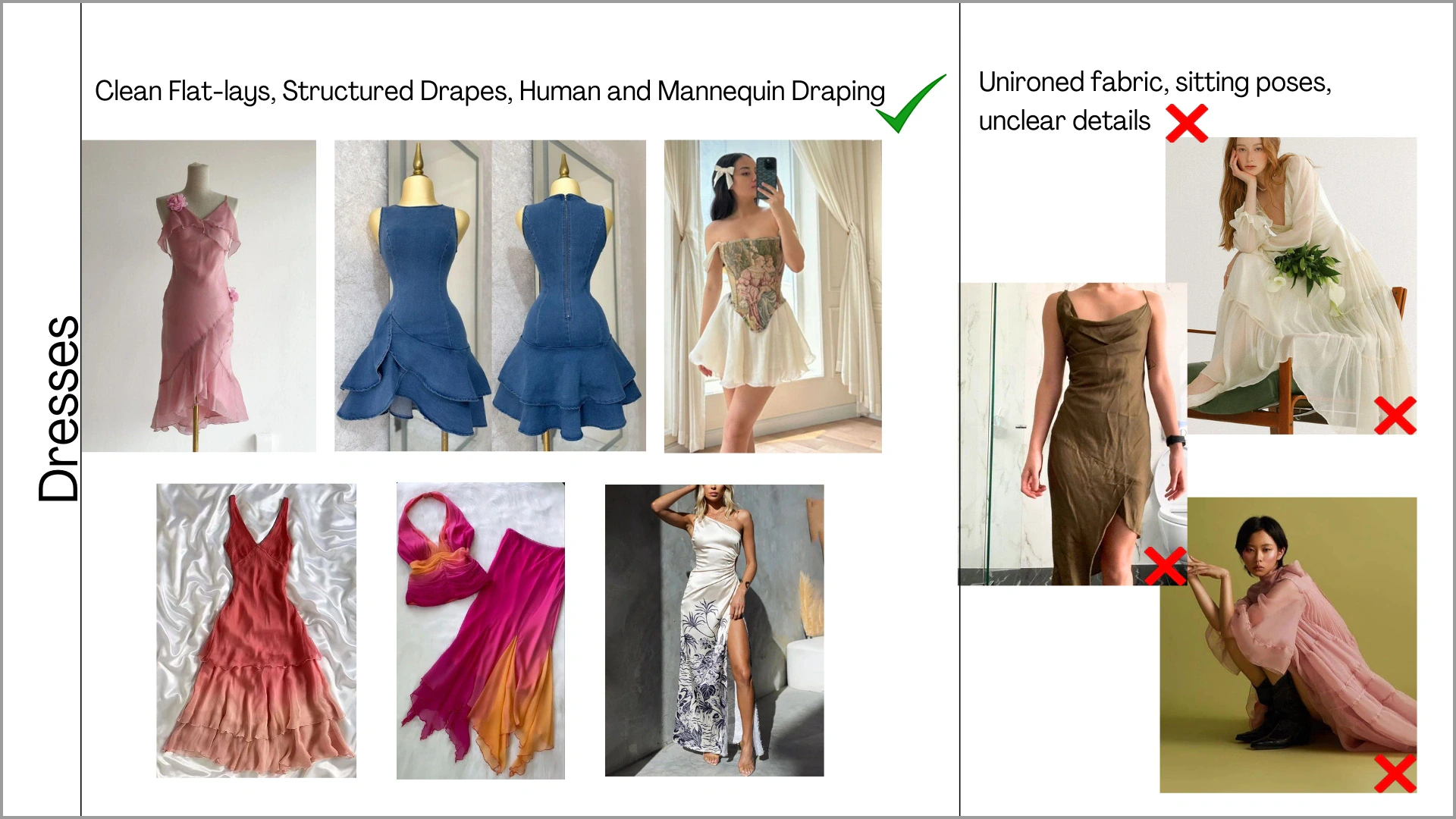
Flowy garments such as Dresses, Gowns, Anarkalis, or flared outfits require clear visibility of their fall and flare. The fabric should be neatly arranged to show how the garment drapes naturally.
**DOs**
* Use neatly draped mannequin or on-human images
* Ensure the full flare, sleeves and tie-up details are visible (spread properly in flatlay if needed)
* Upload ironed, wrinkle-free garments
**DON'Ts**
* Avoid crumpled or unironed fabrics
* Do not upload incomplete or cropped views
* Avoid poses where sleeves or important details are hidden
### Flowy Dresses / Fluid Garments
Flowy garments such as Dresses, Gowns, Anarkalis, or flared outfits require clear visibility of their fall and flare. The fabric should be neatly arranged to show how the garment drapes naturally.
**DOs**
* Use neatly draped mannequin or on-human images
* Ensure the full flare, sleeves and tie-up details are visible (spread properly in flatlay if needed)
* Upload ironed, wrinkle-free garments
**DON'Ts**
* Avoid crumpled or unironed fabrics
* Do not upload incomplete or cropped views
* Avoid poses where sleeves or important details are hidden
 ### Heavy Detailing
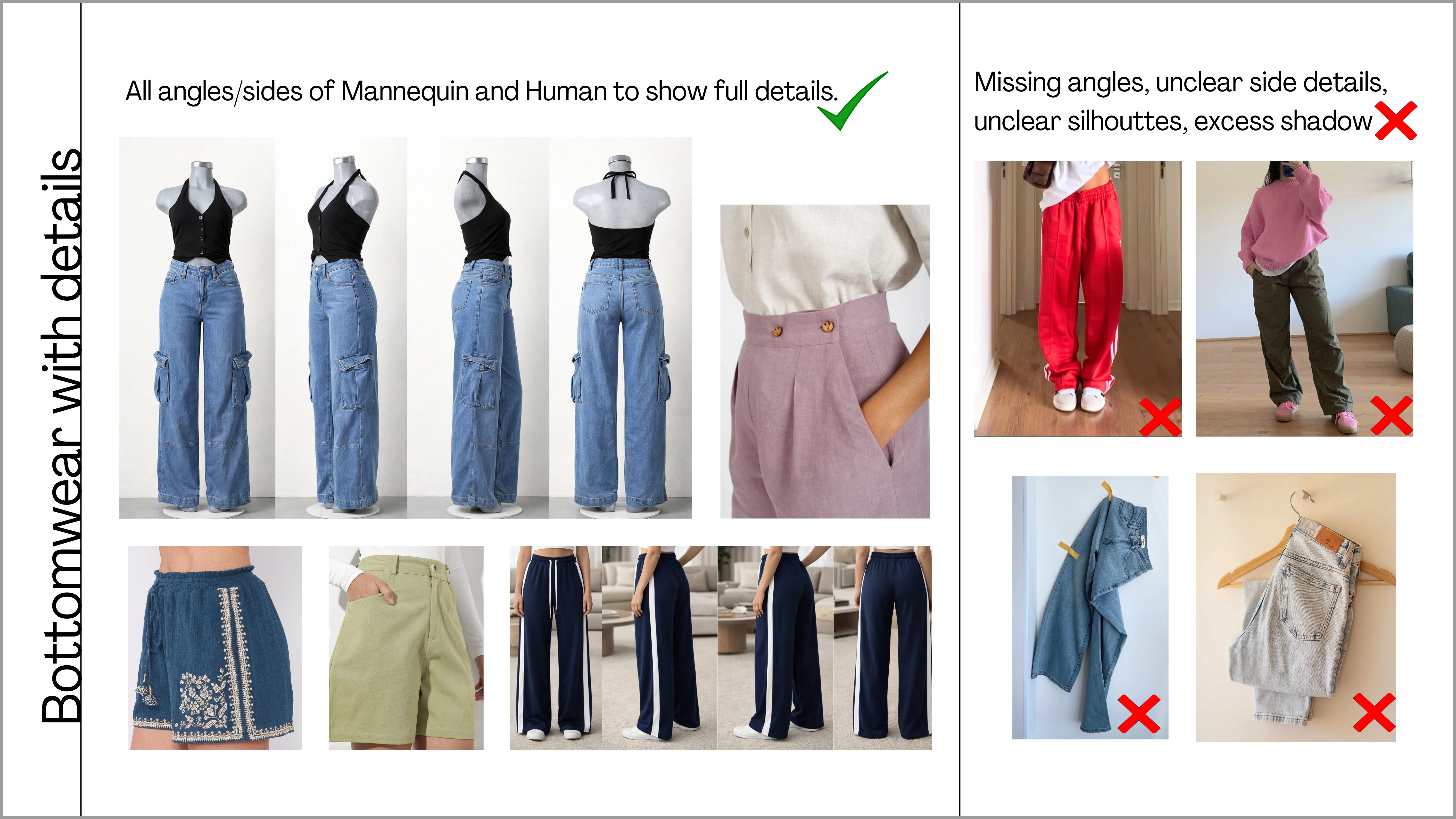
While a plain, basic pair of pants can be uploaded using simple front and back flat-lay images, garments like cargos, utility pants, and detailed trims that include side pockets, zippers, or other structural elements need additional angles to capture the full design accurately.
**DOs**
* Upload mannequin or on-human images with all visible side angles to show pockets, and other side/back details
* Keep the garment properly shaped and wrinkle-free
**DON'Ts**
* Avoid single flatlay images that hide side detailing
* Do not crop out pockets or side seams
* Avoid unclear or shadow-heavy images
### Heavy Detailing
While a plain, basic pair of pants can be uploaded using simple front and back flat-lay images, garments like cargos, utility pants, and detailed trims that include side pockets, zippers, or other structural elements need additional angles to capture the full design accurately.
**DOs**
* Upload mannequin or on-human images with all visible side angles to show pockets, and other side/back details
* Keep the garment properly shaped and wrinkle-free
**DON'Ts**
* Avoid single flatlay images that hide side detailing
* Do not crop out pockets or side seams
* Avoid unclear or shadow-heavy images
 ## Camera Settings
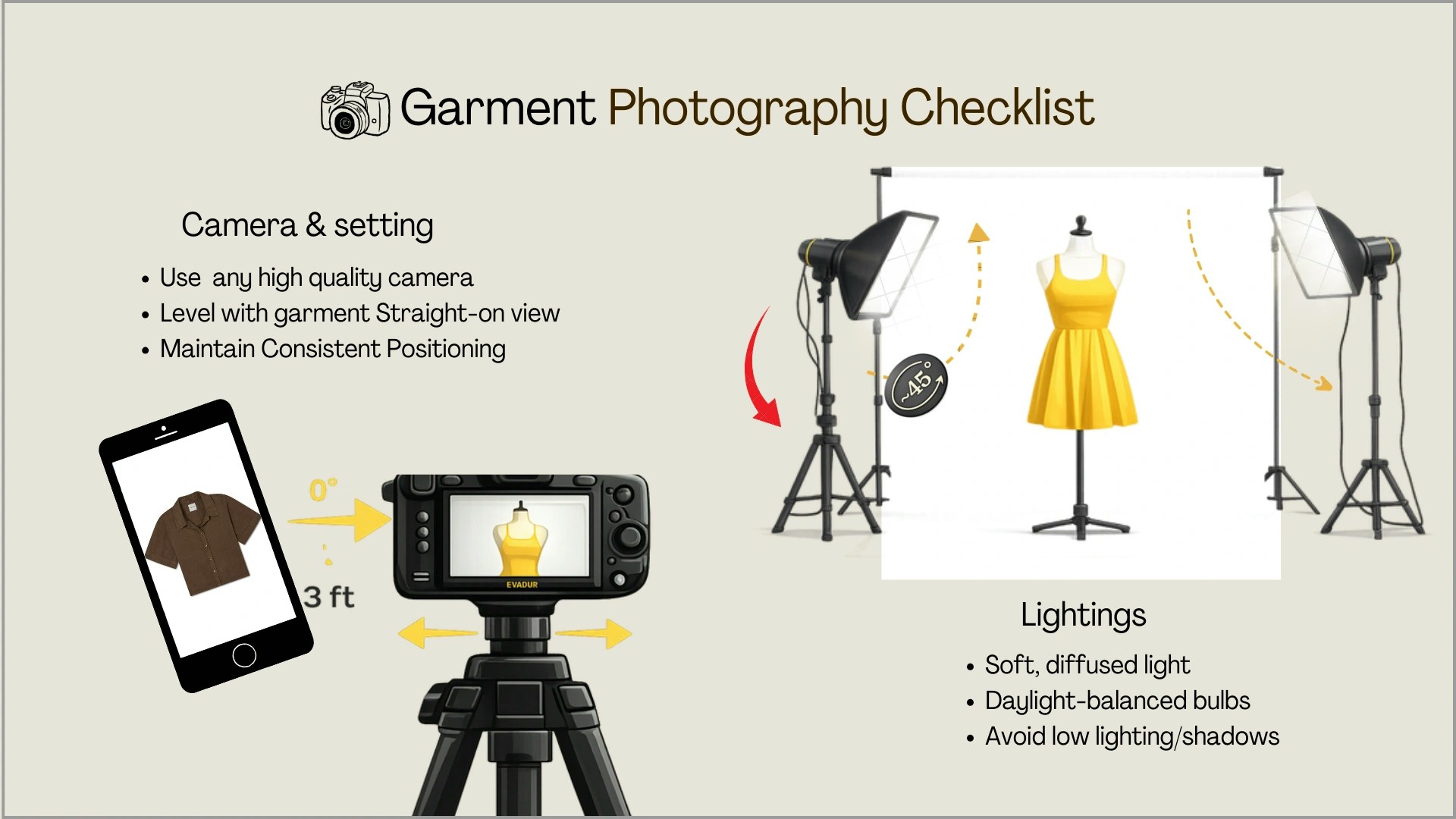
Ayna's AI relies on the quality of your input images to generate accurate results. Poor lighting, blur, or busy backgrounds can cause the AI to misread garment details, affecting the final output. Keep these essentials in mind:
* **Shoot at the highest resolution your device supports. Ayna accepts images from 1K (1024x1024) up to 8K (8192x8192)** — higher resolution captures fabric texture and detailing more accurately.
* Use consistent, even lighting. Harsh shadows or mixed light can cause the AI to misinterpret garment colors and silhouette edges.
* Keep the entire garment in frame — no cropping at sleeves, hemlines, or collars. The AI needs to see the full garment structure to generate it accurately.
* Use a plain, uncluttered background (white or neutral). Busy backgrounds make it harder for the AI to separate the garment from its surroundings.
## Camera Settings
Ayna's AI relies on the quality of your input images to generate accurate results. Poor lighting, blur, or busy backgrounds can cause the AI to misread garment details, affecting the final output. Keep these essentials in mind:
* **Shoot at the highest resolution your device supports. Ayna accepts images from 1K (1024x1024) up to 8K (8192x8192)** — higher resolution captures fabric texture and detailing more accurately.
* Use consistent, even lighting. Harsh shadows or mixed light can cause the AI to misinterpret garment colors and silhouette edges.
* Keep the entire garment in frame — no cropping at sleeves, hemlines, or collars. The AI needs to see the full garment structure to generate it accurately.
* Use a plain, uncluttered background (white or neutral). Busy backgrounds make it harder for the AI to separate the garment from its surroundings.